"Unlocking and Utilizing the Global Palbox in Palworld"
- By Camila
- Apr 09,2025
If you thought *Pokemon* and *Palworld* couldn’t get any more similar, think again! The latest update in March 2025 introduces the Global Palbox feature, allowing players to transfer their beloved Pals between different worlds. This exciting addition can be a bit tricky to master, so let's dive into how to get and use the Global Palbox in *Palworld*.
How To Get the Global Palbox in Palworld
With the March 2025 update, the Global Palbox is now accessible to all *Palworld* players. To get started, navigate to the Build screen and scroll to the Pal section. You'll spot the Global Palbox, which looks like a futuristic structure complete with a radio dish. To construct it, you'll need:
- 1 Paldium Fragment
- 8 Wood
- 3 Stone
These resources are plentiful in *Palworld*, and most seasoned players will already have them in abundance. If you're running low, here's where to find each:
| Resource | Location |
| Wood | Obtained by cutting trees. |
| Stone | Obtained by mining rocks. |
| Paldium Fragment | Obtained by mining Paldium rocks. |
How To Use the Global Palbox in Palworld
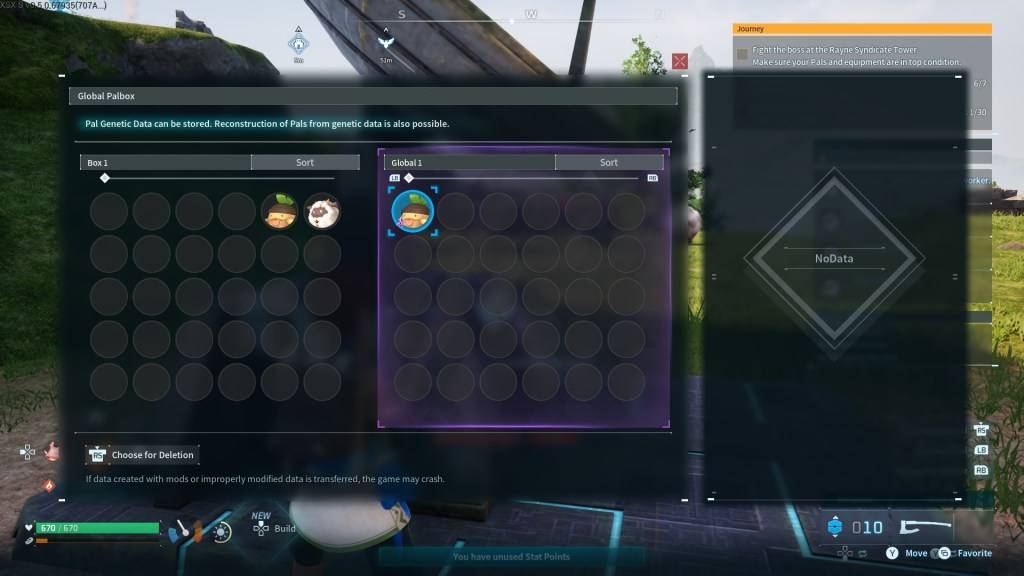 Unlike *Pokemon*, where you can transfer a Pokemon from one game to another, *Palworld* allows you to store your Pal's Genetic Data in a Global database. This data can then be used to reconstruct your Pal in another world, allowing you to keep your original Pal while having another version in a different world. Remember, only one version of a specific Pal can be reconstructed in each world.
If you're eager to use your favorite Pals across multiple worlds, follow these steps to use the Global Palbox in *Palworld*:
Copying a Pal’s Genetic Data
- Load into the first *Palworld* world.
- Construct and open the Global Palbox in the first world.
- Locate the desired Pal in your boxes.
- Move the Pal’s Genetic Data to the Global database.
Reconstructing a Pal
- Load into the second *Palworld* world.
- Construct and open the Global Palbox in the second world.
- Locate the desired Pal’s Genetic Data and move it to your boxes.
- Find the Pal in your boxes and move them into your party to reconstruct.
You can repeat this process as many times as you want, enhancing your gameplay across multiple worlds. This feature adds a new layer of excitement to catching Pals, as they now have the potential to thrive in multiple worlds.
And that's how to get and use the Global Palbox in *Palworld*. If you're looking for more tips, check out how to make Pals transport items to another location in the game.
*Palworld is available now in Early Access on PlayStation, Xbox, and PC.*
Latest News
more >-
-

- Universal Piece Trello and Wiki Links
- Oct 22,2026
-

-

-




