Disney Solitaire: Ultimate MAC Guide
- By Bella
- May 04,2025
Experience the enchanting blend of classic solitaire gameplay and Disney's magical universe with Disney Solitaire. This delightful game features stunning artwork, soothing music, and beloved Disney characters, offering a relaxing yet engaging card game experience. For those who appreciate larger screens and enhanced controls, playing Disney Solitaire on a MAC is an excellent choice. Utilizing BlueStacks Air, a streamlined Android app platform for MAC, you can easily set up the game for a smoother and more immersive gaming experience.
Enjoy the Classic Solitaire with a Disney Twist!
One of the key benefits of playing Disney Solitaire on a MAC is the ability to use a keyboard and mouse. These peripherals provide precise control and make repetitive card-flipping actions more effortless. During our testing on a MacBook, we discovered that the game is remarkably user-friendly. It's perfect for playing on the go, whether you're on a train, in a café, or just relaxing at home. The casual nature of the gameplay is significantly enhanced on a MAC, thanks to its vibrant and crystal-clear 4K Retina display.
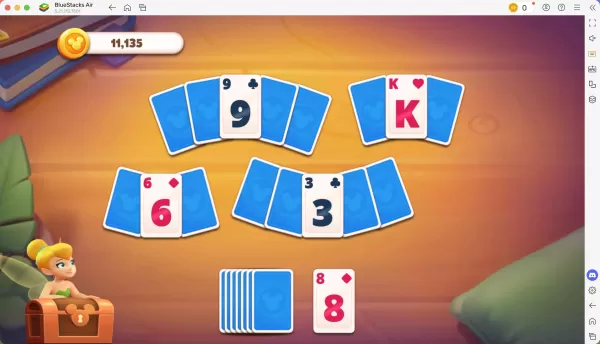
Progress Further with Precise Controls!
Each level you conquer in Disney Solitaire earns you a star, which can be used to unlock new cutscenes and characters, enriching the game's narrative. When playing on a MAC with BlueStacks Air, you can customize controls for different actions. BlueStacks automatically assigns default controls for each game, including Disney Solitaire. To view these controls, press SHIFT + TAB on your Mac keyboard. If the default settings don't suit you, you can easily customize them to create your own control scheme and assign different key bindings to various game activities.
How to Install and Start Playing Disney Solitaire on BlueStacks Air
Follow these straightforward steps to begin your Disney Solitaire adventure on your Mac:
- Download BlueStacks Air: Visit the game’s page and click on the "Play Disney Solitaire on MAC" button to download the installer.
- Install BlueStacks Air: Double-click the BlueStacksInstaller.pkg file and follow the on-screen instructions to complete the installation.
- Launch and Sign-In: Open BlueStacks Air from your Launchpad or Applications folder. Sign in with your Google account to access the Play Store.
- Install Disney Solitaire: Search for Disney Solitaire in the Play Store and install it.
- Enjoy the Game! Launch the application and embark on your nostalgic journey through the Disney multiverse!
Latest News
more >-
-

-
-
-

- Skate Story Release Date and Time
- Sep 20,2026



